
 14 minutes read
You already know the scene. It's 9:40 p.m., someone's reformatting the same agreement for the fourth time, and Word has decided to be clever with numbering again. A partner wants the “final-final” version, a paralegal is hunting for the right clause, and nobody trusts the last draft because three people edited it in three different places. That's not a workflow, that's expensive chaos with a sidebar.
Legal document automation exists to stop that nonsense. And the market has long since stopped treating it like a cute internal efficiency trick. One industry estimate puts the global legal document automation software market at about USD 1.28 billion in 2026, another forecasts growth from USD 1.2 billion in 2024 to USD 3.5 billion by 2033 at a 15.5% CAGR, and a separate forecast places it at USD 746.09 million in 2026 rising to USD 1.913 billion by 2035 at 11.03% CAGR (Business Research Insights market overview). Those estimates don't match exactly, which is fine. They do agree on the important bit, this category isn't niche anymore.

If your firm still treats repetitive drafting as a normal cost of doing business, you're choosing to bleed margin the old-fashioned way. That's a funny way to run a professional services business, if by funny you mean annoying and financially dumb. For teams also trying to clean up their document stack, the right document management system matters, but it doesn't solve the drafting problem on its own.
The ugliest cost in a law firm is usually the one nobody bothers to track. It is the hour spent rewriting the same engagement letter, the half hour spent fixing clause drift, the five minutes burned every time someone asks which version is current. Multiply that across a week, then a quarter, then every practice group, and you have a steady leak that funds your firm's worst habits.
If your team still treats repetitive drafting as normal, you are choosing to lose margin the old way. That is not clever operations, it is a broken habit with a clean timesheet. For firms trying to clean up their document stack, the right document management system matters, but it does not solve drafting on its own.
The old model depends on people copying old files, retyping clauses, and hoping they do not miss a defined term. That is slow, and it is also a problematic approach because it creates inconsistency you will later pay someone else to clean up. Every time a lawyer edits by hand, the firm either absorbs non-billable time or charges the client for work that should have been faster and cleaner.

Practical rule: if a document family is repetitive, standardized, and high-volume, manual drafting is probably costing you more than the software would.
The modern model is far less glamorous and far more useful. Firms build templates, collect structured inputs, and let the software generate the finished document automatically, often with workflow triggers and conditional logic (Business Research Insights market overview). That is the difference between a document and a system.
There is a reason this category keeps growing. Teams are tired of version confusion, tired of copy-paste errors, and tired of paying senior people to do junior work. If you are still calling that good enough, you are paying premium rates for administrative muscle memory.
The blunt truth is simple. Manual drafting is a business decision, not a default. And it is usually the expensive one.
Legal document automation is a system, not a shortcut. It uses a combination of templates, client data, and rules to produce documents that fit the matter without forcing lawyers to retype the same provisions and clean up avoidable errors.
Thomson Reuters describes the modern setup plainly, automated legal templates, user questionnaires, and instant document generation from those inputs (Thomson Reuters document automation guide). That is the core of it. You collect the right data once, then the system builds the document from that information.
Conditional logic is what separates real automation from a polished fill-in-the-blanks exercise. One clause appears when the client is in a certain jurisdiction. Another paragraph appears when the matter type changes. A signature block shifts when the entity is a company instead of an individual. That is not decorative tech language, it is how firms stop drafting every document from scratch.
Consider a template as the framework, the questionnaire as the intake form, and the logic as the decision engine. Without the logic, you have a smarter clipboard and not much else.
If you want a practical example of how AI-driven review can support that workflow, discover Cyndra's AI capabilities and compare how review support sits alongside document generation. It is a useful reference point, especially if your team is still doing manual clause checks.
That distinction matters. A static template still depends on memory, discipline, and luck. A real automation setup standardizes language, captures data once, and produces consistent output across practice areas and attorneys. That cuts down messy variation and gives the firm a repeatable operating process instead of a folder full of almost-right documents.
If someone on your team says, “We already have templates,” ask the uncomfortable follow-up. Do you have templates, or do you have a folder full of future surprises? That answer usually clears up the room very quickly.
A proper rollout also needs process discipline, which is why teams that want this to pay off should look at business process improvement techniques instead of treating automation like a software purchase and hoping for the best.
This is the part where the marketing copy usually gets smug and useless. Let's not do that. The payoff from legal document automation is not abstract, it's time back, fewer mistakes, and more expensive people doing expensive work instead of typing the same words again.
Industry guidance says document automation can cut preparation time by up to 70% for standard contracts and compliance forms, while Gartner-cited estimates place overall operational savings at 20% to 30% (Isometrik legal document automation overview). Those are useful numbers, but only if you translate them into how your firm makes money. Faster drafting matters because it frees attorneys from repetitive work and reduces avoidable rework.
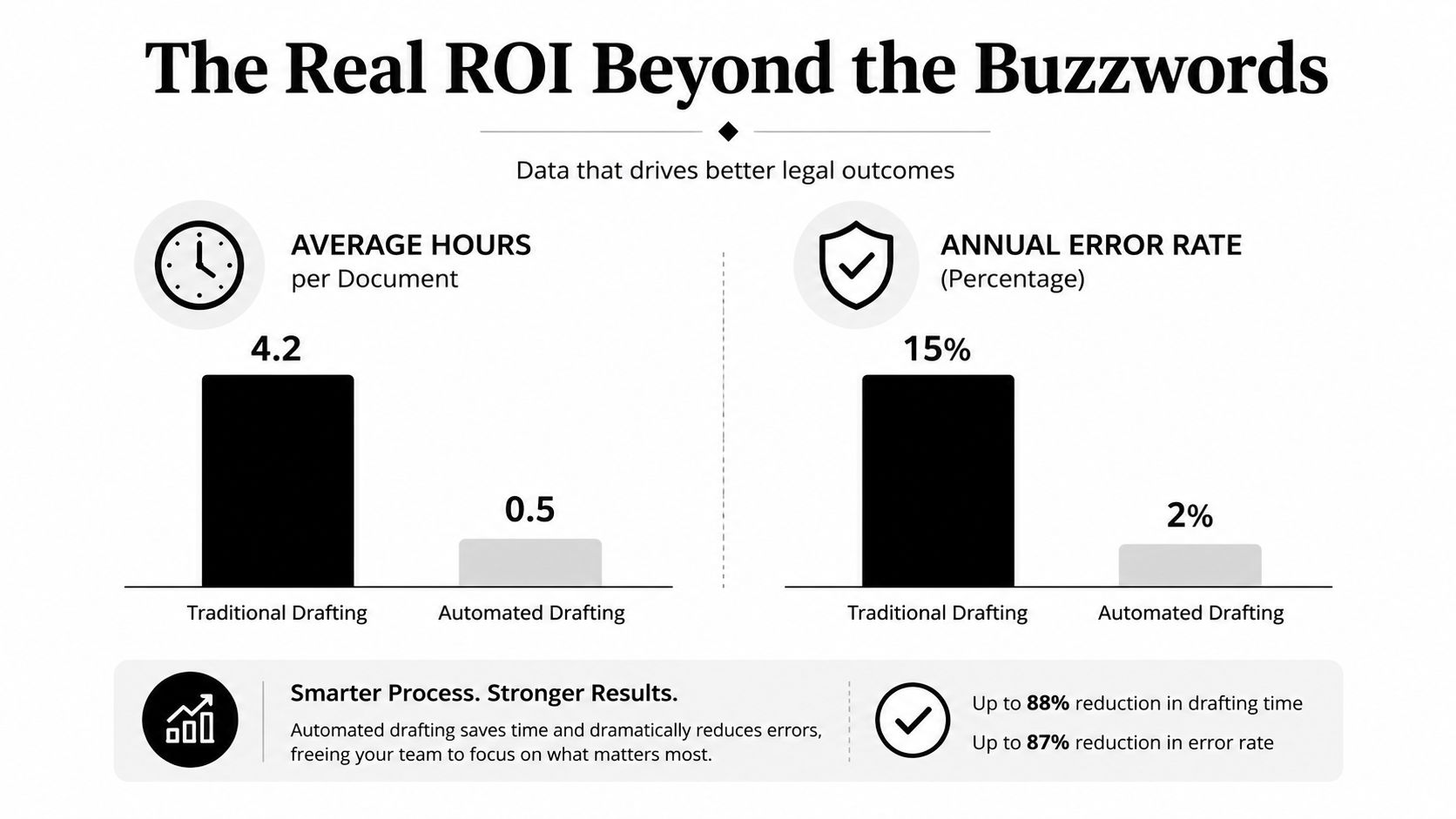
The Thomson Reuters guidance gives you concrete examples worth paying attention to. A Licence to Underlet saved approximately 18 minutes, a Legal Opinion saved 30 minutes, and a Construction Appointment Suite saved 1 to 1.5 hours per document (Thomson Reuters document automation guide). Those are not vanity metrics. They're the difference between someone spending their afternoon drafting versus advising.
Here's the only calculation that matters. If a template saves 18 minutes and your team uses it all the time, those minutes stop being invisible. They become recoverable attorney time, lower review overhead, and better throughput on the same headcount. That's the prize, not some vague “efficiency” slogan that makes the CFO squint.
For firms trying to quantify where time is leaking during review and drafting, contract review automation is worth looking at because it forces the process into measurable steps. If you can't measure it, you can't defend it.
Automation also reduces the usual copy-paste nonsense that sneaks into manual drafts. Standard logic means the right clause gets pulled in, the wrong one stays out, and the firm spends less time fixing avoidable mistakes. That matters because every correction costs money, even when nobody labels it that way.
Bottom line: the ROI isn't just faster document production, it's reclaiming senior time for work clients actually value.
If you're still billing lawyers to do low-value formatting and clause shuffling, you're subsidizing inefficiency. Nice little hobby, terrible business model.
Don't start with the whole firm. That's how projects turn into committee theater with a software bill attached. Start with one document family, one owner, and one clear outcome you can track without needing a priest and a spreadsheet wizard.
The best implementation pattern is boring on purpose. Thomson Reuters recommends a pilot period and focusing on a discrete area with a high volume of similar documents, such as real estate, before scaling more broadly (Thomson Reuters document automation guide). That's the right instinct. You're proving value, not auditioning for a technology keynote.
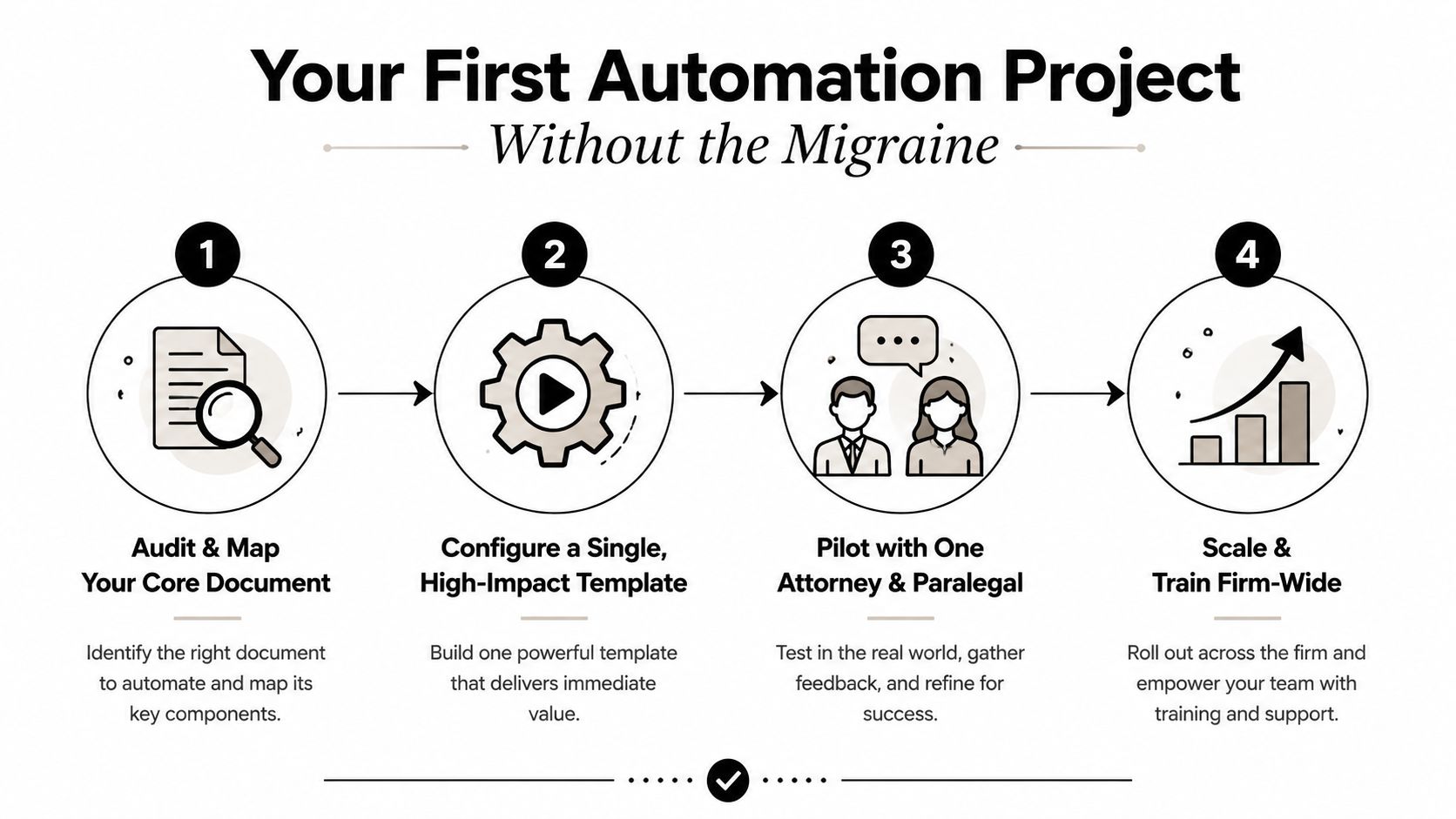
Audit the documents that show up constantly, the engagement letters, NDAs, leases, intake forms, and similar repeat offenders. Then rank them by volume and pain. The goal is to find the work that's both repetitive and stable enough to automate without creating a legal archaeology project.
That's where firms get practical. HyperStart's guidance points to starting with a short list, often the top 3 to 5 highest-volume documents, instead of trying to automate everything at once (HyperStart legal document automation guidance). That's the right amount of ambition.
A good pilot has one attorney and one paralegal using the thing in real work. Not ten observers, not a steering committee, not three “champions” who never touch the document after launch. One clean use case tells you more than six pretty demos.
Here's a workable sequence:
Useful habit: launch one template cleanly, then fix what breaks before anyone declares victory.
For firms that want structured process discipline around this work, business process improvement techniques are a solid companion to the automation rollout. Automation without process cleanup is just faster mess-making.
Many firms make a critical error. They purchase software and assume it will run on its own. It won't. Someone must own the templates, test the logic, manage updates, and prevent the firm from sliding back into clause chaos.
That role matters enough to deserve a name. Call it the automation manager if you want, but don't pretend it's a side task. Thomson Reuters says successful implementation needs a business case, a project team, testing, launch planning, and a change-management strategy (Thomson Reuters benefits of document automation). In plain English, somebody has to babysit the system properly.
Assigning template ownership to a senior partner is a terrible use of expensive time. Partners should be setting legal strategy, not debugging conditional clauses because a dropdown stopped behaving. That's a fast route to resentment and a very expensive automation program.
The smarter move is to use skilled support staff who can own the operational side. A well-trained paralegal is often the right person to manage template updates, test changes, and coordinate with attorneys on revisions. If you need that support in a flexible model, HireParalegals is one option for sourcing remote legal support, including paralegals who can handle document and workflow work.
Automation needs someone who is detail-oriented, organized, and unglamorous in the best possible way. That's a very different skill set from rainmaking or litigation strategy. Put the right person in the chair and the system gets better every week. Put the wrong person there and the firm gets a stale template graveyard.
Operational truth: software is leverage, but only if someone competent is steering it.
Automation scales effectively when a single skilled operator can maintain multiple templates, which is far more efficient than having every attorney manage their own isolated process. This is how automation becomes a true productivity engine rather than just another subscription your finance team scrutinizes at renewal.
The biggest mistake is not technical. It's picking the wrong work to automate first. If the document is too jurisdiction-sensitive, too exception-heavy, or too dependent on attorney judgment, you're asking for pain and then acting surprised when it arrives wearing work boots.
There's also a governance problem hiding in plain sight. Thomson Reuters says implementation needs testing, launch planning, and change management, and that's because automated documents drift if nobody owns them (Thomson Reuters benefits of document automation). Once the firm launches, someone has to control versioning, test conditional logic, and keep updates from turning into a free-for-all.
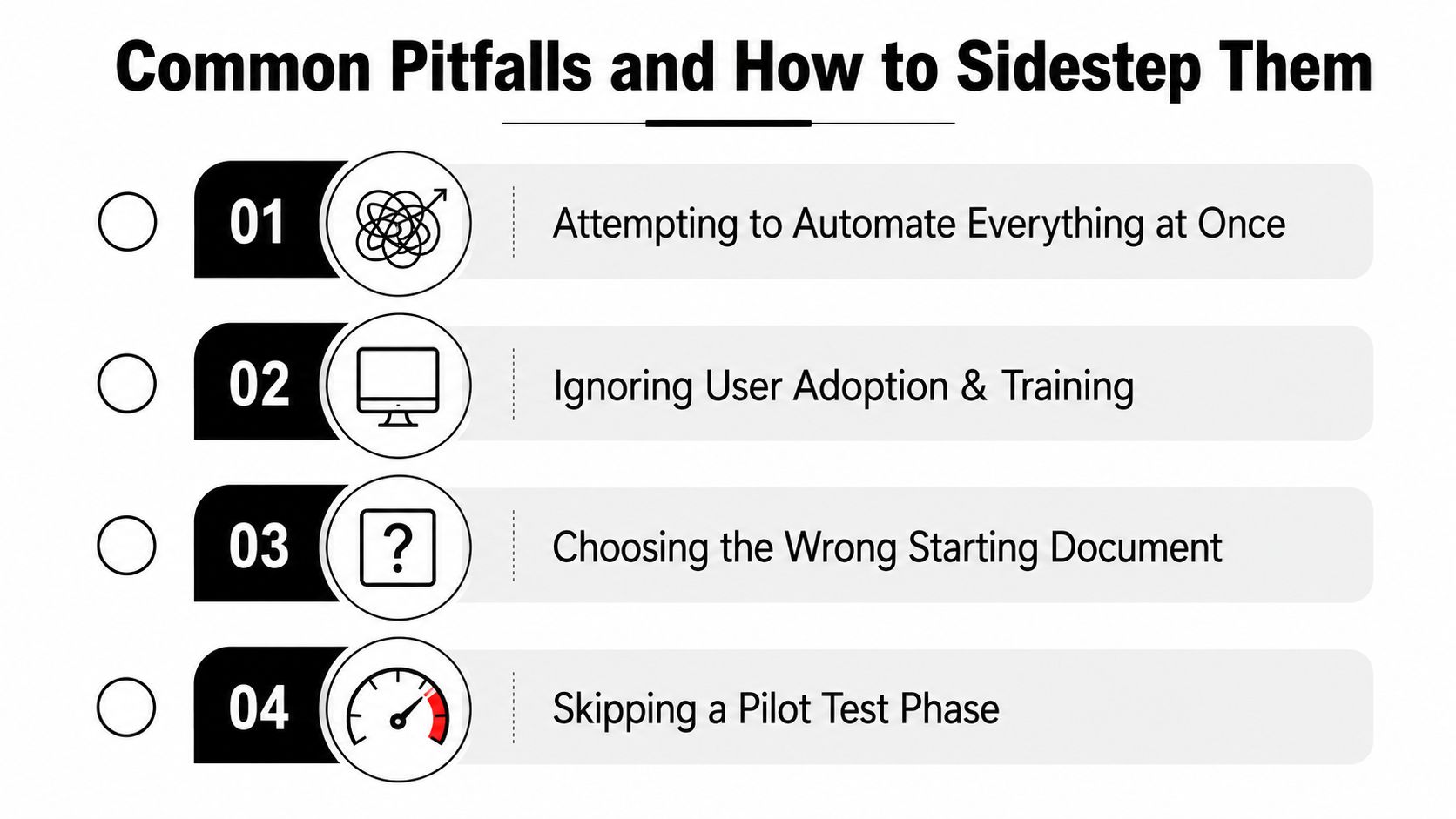
The same handful of errors shows up over and over again:
Automation also touches client data, which means privacy and control can't be an afterthought. If your workflow handles sensitive information, you need clear rules for access, storage, and review. The essential guide to data privacy is a useful reminder that the legal side of automation doesn't end with the document itself.
If multiple practice groups can edit the same template without a clear approval path, your firm isn't automating, it's improvising.
That's why version control and ownership matter so much. A template is only useful if people trust it. Once they stop trusting it, they'll bypass it, and your ROI will go straight into the witness protection program.
The point of legal document automation isn't to replace lawyers. It's to stop paying lawyers to act like copy machines. Automation takes the repetitive drafting off their plates so they can focus on judgment, negotiation, client contact, and the parts of the job that justify the hourly rate.
That shift matters more than firms admit. Thomson Reuters is explicit that automation doesn't replace attorneys, it frees them to handle rapport, investigation, strategy, and final review (Thomson Reuters document automation guide). Good. That's the right division of labor.
Once the routine drafting disappears, the whole tone of the practice changes. Staff stop firefighting version issues. Attorneys stop wasting afternoons on formatting. Clients get cleaner documents faster, and the firm looks more organized because, shockingly, it is more organized.
That's what future-proofing looks like. Not some grand transformation speech, just fewer stupid bottlenecks and more time spent on work that requires genuine legal judgment. Toot, toot, but that's the business case.
If you take one thing from this, make it this. Buy legal document automation only if you're willing to assign ownership, run a pilot, train users, and govern the templates after launch. Otherwise you're just purchasing a more expensive way to disappoint yourself.
Start with the high-volume documents, keep the pilot tight, and staff the system like it matters. Then let your lawyers do what clients are paying for. If you're ready to stop feeding Word your margin, map your highest-volume templates this week, assign one owner, and test a pilot before the quarter disappears into another round of manual drafting.